Let’s create an endpoint (GET /user) that will allow a user who is logged in to retrieve the information in their User document.
Since we don’t want a user to retrieve personal information about another user (without their consent) we’ll require the client provide in the request the auth token of the user who is making the request. When the endpoint receives the request, the endpoint will decrypt the auth token to retrieve the payload in the token where it will find the user’s id. We’ll then retrieve the document in the User collection that belongs to the user and return it to the client.
Since most of our endpoints require authentication, we’ll create a middleware function to process the auth token, and for each endpoint that requires authentication, we’ll have the router execute the middleware before the endpoint handler.
Defining Auth Middleware
If you don’t have a src/middleware directory already, please create one now. Then inside the middleware directory, create a file named auth.js and add the following code to the file.
import jwt from 'jsonwebtoken'
import User from '../models/User.js'

export const auth = async (req, res, next) => {
    try {
        let token = req.header('Authorization')
        if (!token) {
            return res.status(400).send("Missing authentication token")
        }

        token = token.replace('Bearer ', '')
        const decoded = jwt.verify(token, process.env.JSON_WEB_TOKEN_SECRET)

        let user = await User.findOne({ _id: decoded._id, authTokens: token })

        if (!user) {
            return res.status(401).send("Authentication failed")
        }

        req.user = user
        req.token = token
        next()
    }
    catch (error) {
        return res.status(401).send("Invalid authentication token")
    }
}
Let’s walk through the code.
Line 1 imports the jsonwebtoken module that we need to decrypt the Auth Token and line 2 imports the User model that we’ll use to retrieve the user’s document from the User collection.
Line 4 established the name of the middleware (auth) and parameters of the function. Since it is a middleware function we have access to the request and response objects that will be passed to the endpoint handler, as well as a next function that we’ll call at the end of the function to cause either the next middleware function (if there is one) or the endpoint handler to be called. Note that we declare this function as asynchronous (async) because we use await later in the code.
On line 6 we retrieve token from the Authorization property of the header that is provided in the request. If no Authorization token is found we immediately return a response to the client (preventing the handler from running) to inform the client that the token is missing.
If we do have a token we remove ‘Bearer ‘ from the string (on line 11) and retrieve the payload (decoded) from the JSON Web token using jwt.verify() on line 12.
Once we have the payload, on line 14 we call User.findOne() passing to it a match filter which searches for a document in the User collection that has an _id field equal to decoded._id and a string in the authTokens array that is equal to token.
On lines 16-18, if no User document is found we again return an error response to the client.
If we do find a User document that matches the credentials in the token we attach the user and token to the req (request) object on lines 20 and 21.
Finally, on line 22 we call next() which calls either any subsequent middleware or if none, the event handler.
Define the GET /user Endpoint
Inside our user router (src/routers/user.js) we can now define a handler for the GET /user endpoint.
At the top of the file import the auth middleware function.
import { auth } from '../middleware/auth.js'
Then copy into the file the endpoint code (shown below) somewhere before the last line which exports the router.
router.get('/user', auth, async (req, res) => {
    return res.send(req.user)
})
Notice we pass auth as the second argument to router.get(). This registers auth as middleware for the endpoint so when Express receives a GET /user request, Express starts the chain of function calls by first calling auth.
As you can see there’s not much we need to do for this endpoint, since all of the work is done in auth. If you recall, auth attached the user document to the req (request) object before calling next(); so in the handler all we need to do is send the user document (req.user) back to the client.
Test With Postman
To verify that the endpoint is working property, let’s send a request via Postman. Before we do, start up your API server in VSC.
Create a new request in your User folder using the settings shown in the screenshot below.
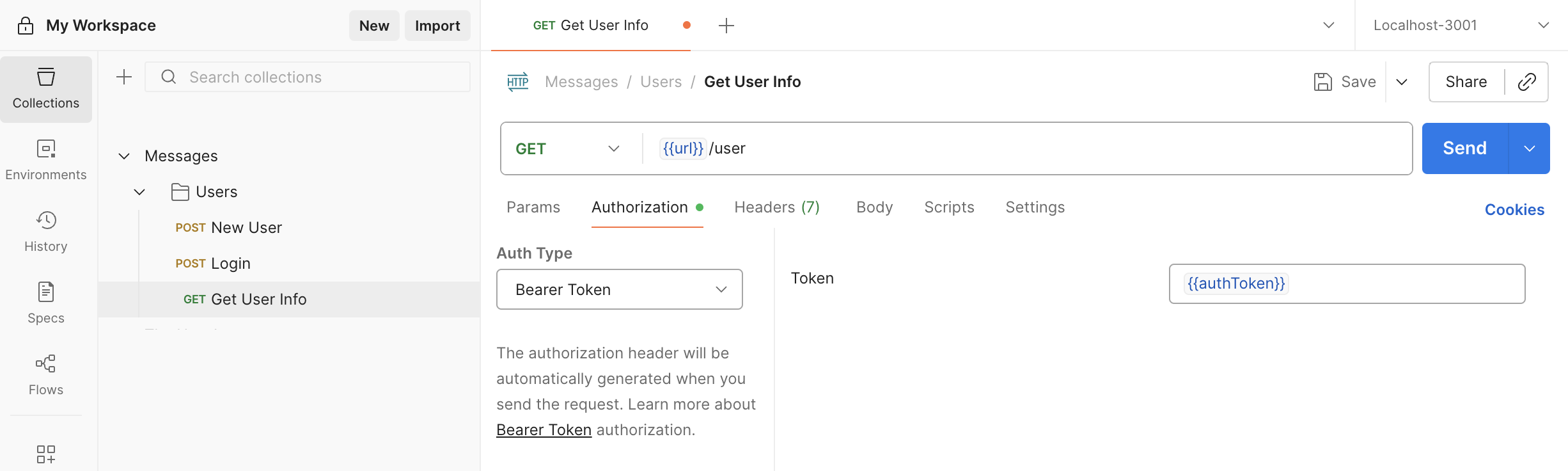
Once you’ve set up the endpoint, press Send. If you get a 400 error, send a login request via Postman, and then try GET /user again.
Limit the Data Returned
If Postman was successful, you might have noticed that the API server is sending the client the password and authToken array. The API server shouldn’t be sending these. To prevent this from happening, let’s add an instance method named toJSON() to the User schema.
userSchema.methods.toJSON = function () {
    const user = this.toObject();

    delete user.password;
    delete user.authTokens;
    delete user.__v;

    return user;
};
The toJSON() method will be called automatically whenever the API server calls res.send(doc). The method converts the user document (this) to an object and deletes the properties that we don’t want to send to the client.
Push to GitHub
If all is well, run git add, git commit, and git push.